
It is sometimes necessary to stop SSLv2 from running on your server to increase security. Disabling SSLv2 in this way simply forces SSLv3 to take over, which is a much more secure process.
To start type regedit in the run/search bar and hit enter.
Backup the registry
Go to HKey_Local_MachineSystemCurrentControlSetControlSecurityProviders SCHANNELProtocols
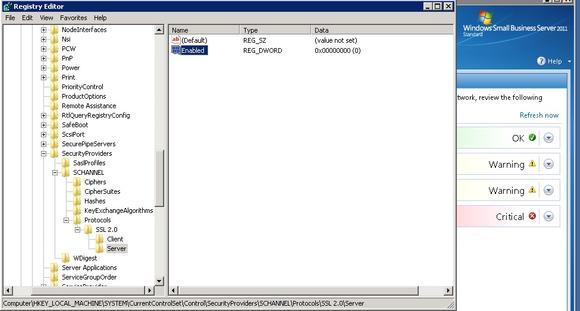
Create a SSL2.0 server key so you have the following:
HKey_Local_MachineSystemCurrentControlSetControlSecurityProviders SCHANNELProtocolsSSL 2.0server
In server key add a DWord called Enabled
Set Enabled data value to 00000000 (The picture above shows what it should look like afterwards)
Click OK and reboot server
Once the server has rebooted then any SSLv2 calls will simply use SSLv3 instead.